Designing a Family Media Room That Works for Every Age
How to design a family media room: picking the room, seating for all ages, light control, soft acoustics, storage, cables, kid-proofing and a craft corner.
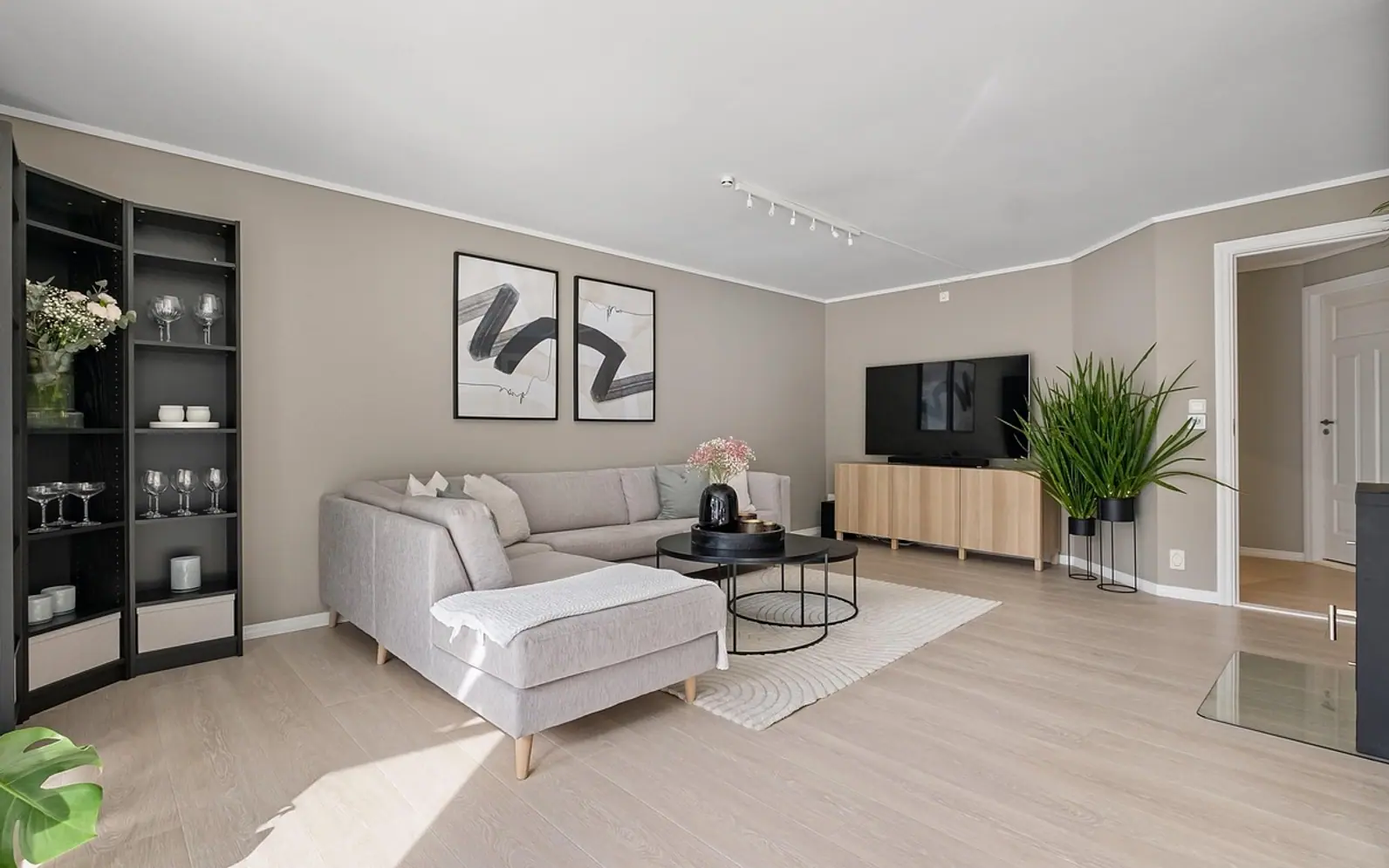
A good family media room is a calm, dimmable space with seating for every age, soft surfaces that tame echo, closed storage for the clutter and cables planned before the furniture arrives. The screen matters less than people expect. What makes the room work is how easily a toddler, a teenager and a grandparent can all settle in, and how quickly it returns to order afterwards.
Choosing which room becomes the media room
Few homes have a spare room waiting for this purpose, so the choice usually comes down to a second living room, a converted attic, a basement or a large bedroom that has lost its original job. Each option has trade-offs worth weighing before buying anything.
| Room | Strengths | Watch out for |
|---|---|---|
| Second living room | Close to the kitchen, easy to supervise children | Large windows, sound carrying into the rest of the house |
| Attic or loft | Separate from daily traffic, cosy sloping ceilings | Heat in summer, low headroom near the eaves |
| Basement | Naturally dark and quiet | Damp, limited daylight for daytime use |
| Spare bedroom | A door to close, modest size is easy to furnish | Shared walls with sleeping rooms |
If the room is mainly for evenings, darkness is an advantage; if children also play there after school, some daylight keeps it pleasant.
Seating for different ages
A single large sofa rarely suits everyone. Small children like to sprawl on the floor, teenagers prefer a seat of their own, and older relatives need something firm with arms to push up from. Mixing pieces gives the room flexibility:
- A deep sofa or modular sectional as the anchor, with washable or removable covers.
- Floor cushions or a low futon that children can rearrange without help.
- One supportive armchair at standard seat height for anyone who finds low sofas hard.
- Stackable stools or poufs that come out when friends visit and tuck away afterwards.
Controlling light
Glare is the most common complaint in family viewing rooms. Lined curtains or blackout blinds handle daylight, while several smaller light sources work better than one bright ceiling fitting in the evening. A dimmer on the main circuit, a lamp behind or beside the screen and low lighting along the walkway let you keep enough light for safety without washing out the picture. If the household likes automation, the same lights can be tied into smart home routines for movie night so one button sets the scene.
Wall colour plays a part too. Mid-tone or deep matt finishes reflect less light back onto the screen than glossy white. If you are repainting, this overview of what shapes residential painting costs helps when deciding whether to do one feature wall or the whole room.
Soft acoustics without a renovation
Hard floors and bare walls make dialogue harder to follow and push sound into the rest of the house. You can soften a room considerably with ordinary furnishings: a large rug under the seating area, heavy curtains, an upholstered sofa, a full bookcase on the wall facing the screen and a few fabric panels or wall hangings. These choices also make the room feel warmer, which matters when it doubles as a play space.
How do I keep noise from reaching the bedrooms?
Place the screen and speakers on a wall that does not back onto a bedroom, add a draught strip to the door and keep the volume moderate in the late evening. Thick rugs help if the room sits above sleeping areas.
Storage for everything that gathers there
Consoles, controllers, set-top boxes, chargers, blankets, board games and the odd forgotten sock all drift towards the media room. Closed storage keeps the space restful. A low cabinet under the screen with ventilated doors suits electronics, while baskets on open shelves work well for blankets and cushions. Give children their own labelled drawer or box so tidying up is part of the routine rather than an argument.
Planning cables before the furniture
Decide where the screen, the internet connection and the power sockets will be before buying the cabinet. A wired network point near the screen often gives a steadier picture than wireless alone. Run cables through a trunking channel along the skirting or behind the cabinet, label each one at both ends and leave a little slack so devices can be pulled forward for cleaning. If new sockets are needed, use a qualified electrician.
Kid-proofing the equipment
- Anchor the television and any tall furniture to the wall with anti-tip straps.
- Choose a cabinet with doors that close firmly, or add child locks.
- Keep remote controls and small batteries out of reach of toddlers.
- Set up parental controls and separate profiles on each device.
- Use cable covers so little hands and feet do not catch on loose wires.
A corner for games and crafts
Media rooms are used more when they are not only for watching. A small table with two chairs, a wipe-clean surface and a shelf of puzzles, paper and pencils gives children something to do while adults watch the news, and it turns the room into a family space during the day.
A Belgian family example
Consider a family in a terraced house near Liège that turns its narrow back living room into a media room. They hang lined linen curtains over the garden door, lay a wool rug over the tiled floor and build a low cabinet along one wall with a wired connection behind it. Because the household follows French-language and Flemish live channels, they compared what is on offer before settling on how television reaches the room; viewers who search for the meilleur IPTV Belgique option often weigh channel lists, picture quality and how many screens the household needs. A pair of floor cushions, a sturdy armchair for visiting grandparents and a fold-down craft table on the opposite wall complete the room.
How big does a media room need to be?
Smaller than many people think. A room that fits a sofa, one extra seat and a clear path to the door is enough; the comfort comes from light, sound and storage, not from floor area.
Plan in this order: location, light, sound, storage and cables, then furniture and decoration. A room built that way stays pleasant long after the new screen stops being new.
Good places to start
 BusinessMaking the Most of Your Space: Strategies for Efficient Use of Waste Containers2 min
 iPhoneThe Rising Popularity of Third-Party iPhone Repair Services2 min
 InvestingFirst Charge vs Second Charge Bridging Loans: What’s the Difference?2 min
 ApplicationsMastering Visual Storytelling with Cinepunch Video Creation Suite2 min
Keep reading House
- 054Preparing a Munich Apartment for Clear, Informative Property Marketing
- 050From Local Trends to Winning Strategies: The Benefits of Comparative Market Analysis
- 046Insider's Guide to Investing in Dachau Rental Properties: Legal Steps, Returns, and Neighborhood Picks
- 045How to Declutter Before a Move: A Room-by-Room Guide for Basements, Attics, and Apartments
- 041Mortgages in Australia Explained: Complete Breakdown for First-Time Homebuyers